




Who it’s for
For the times you still need to fax
-
One important form
Send an application, signed agreement, government form or other document without committing to a sending subscription.
-
A fax number for replies
Choose a dedicated US or Canadian number when an office, client or service needs to fax documents back to you.
-
Paperwork already on your Mac
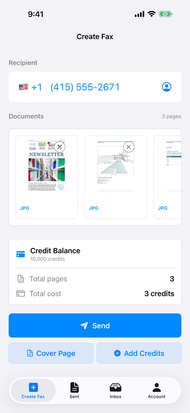
Drag in PDFs or images, combine documents, add a cover page, and send from the native Mac app.
-
A local automation workflow
On Mac, opt in to the localhost MCP server to connect compatible tools to the signed-in FaxIt app.
How it works
Send a fax from anywhere
-
Snap the document
Your iPhone camera is the scanner. Sign it, scan it, done. Already have the file? Use that.
-
Send it in seconds
In a parking lot, at the kitchen table, on the road. If you have signal, you can fax.
-
Get proof it arrived
See the moment it’s delivered, and share a receipt if anyone says they never got it.
Your choice
Ways to fax
Buy or earn credits for an occasional fax, or get a number with an optional ad-free plan.
-
Pay as you go
FromBuy credits in the app for the fax you need to send. No sending subscription required.
- Unused credits do not expire.
- Use the same balance on iPhone, iPad and Mac.
-
Earn free fax credits
Get credits without paying. Two optional ways to earn are built into the app.
- On iPhone or iPad: watch an eligible ad when one is available. No rewarded video on Mac.
- On iPhone, iPad or Mac: invite a friend who signs in and claims your invitation.
-
Ad-free number plans
FromChoose an optional monthly plan for a dedicated US or Canadian fax number and an inbox.
- Choose a monthly allowance or an unlimited plan, as shown in the app.
- Receiving requires an active number subscription.
One credit sends one page to a US or Canadian destination; other supported destinations use two credits per page. A cover page counts as a page. See the app for current prices and plan terms.
FAQ
Frequently asked questions
Can I send a fax for free with FaxIt?
FaxIt is free to download. Sending uses credits or a plan’s included usage. You can buy credits, or earn free ones by watching an eligible rewarded ad on iPhone or iPad or by inviting a friend. Receiving requires a paid number subscription.
How do I earn free fax credits?
Watch an eligible rewarded ad on iPhone or iPad, or invite a friend who signs in and claims your invitation. Sharing a link alone does not earn credits. The app shows the offer, eligibility, and grant status; amounts may vary and pending credits are not yet granted. Mac supports referrals, not rewarded video ads.
How many credits does a fax use?
Sending to a US or Canadian destination uses one credit per page. Other supported international destinations use two credits per page. Cover pages count. Purchased and earned credits have the same sending value; a credit does not always equal an international page.
Do I need a subscription to send a fax?
No. Pay-per-page sending is available with credits purchased in the app. A monthly plan is optional and is intended for people who want a dedicated receiving number and plan-covered usage.
Do unused FaxIt credits expire?
No. Unused page credits remain on your FaxIt account for a future fax.
Can FaxIt receive faxes?
Yes. A FaxIt Number plan provides a dedicated US or Canadian fax number. Incoming faxes appear in the app’s Inbox as documents you can open, save, or share.
Can I use the same FaxIt account on iPhone, iPad, and Mac?
Yes. FaxIt is native on iPhone, iPad, and Mac. Your signed-in account keeps the same credit balance, fax number, and sent or received history available across those devices.
How do I know whether my fax was delivered?
FaxIt shows the delivery status in your fax history. A confirmed delivery includes a receipt you can open and share.
What is FaxIt automation on Mac?
FaxIt for Mac includes an optional localhost MCP server for compatible automation tools. It is off until you enable it, runs while FaxIt is open, and uses the signed-in app account for supported account, history, document, and sending actions.